OAuth 2.0 资源服务器不透明令牌
用于内省的最小依赖项
如Minimal Dependencies for JWT所述,资源服务器的大部分支持功能都集成在 spring-security-oauth2-resource-server 中。然而,除非提供了自定义的 OpaqueTokenIntrospector,否则资源服务器将回退到使用 SpringOpaqueTokenIntrospector。这意味着,要构建一个支持不透明 Bearer Token 的最小化可运行资源服务器,仅需 spring-security-oauth2-resource-server 即可。
内省的最小配置
通常,不透明令牌可以通过授权服务器托管的 OAuth 2.0 内省端点 进行验证。这在需要撤销令牌时非常方便。
在使用 Spring Boot 时,将应用程序配置为使用自省(introspection)的资源服务器包含两个基本步骤。首先,引入所需的依赖项;其次,指定自省端点的详细信息。
指定授权服务器
要指定内省端点的位置,只需执行:
spring:
  security:
    oauth2:
      resourceserver:
        opaquetoken:
          introspection-uri: https://idp.example.com/introspect
          client-id: client
          client-secret: secret
其中 [idp.example.com/introspect](https://idp.example.com/introspect) 是由您的授权服务器托管的令牌自省端点,而 client-id 和 client-secret 则是调用该端点所需的凭证。
资源服务器将使用这些属性进行进一步的自我配置,并随后验证传入的JWT。
使用内省时,授权服务器的判断即为最终标准。如果授权服务器回应令牌有效,那么它就是有效的。
就这样!
启动预期
当使用此属性及这些依赖项时,资源服务器将自动配置自身以验证不透明承载令牌。
这个启动过程比 JWT 要简单得多,因为无需发现端点,也不会添加额外的验证规则。
运行时预期
一旦应用程序启动,资源服务器将尝试处理任何包含 Authorization: Bearer 头的请求:
GET / HTTP/1.1
Authorization: Bearer some-token-value # Resource Server will process this
只要此方案被指明,资源服务器将尝试根据 Bearer Token 规范处理请求。
给定一个不透明令牌,资源服务器将
-
使用提供的凭据和令牌查询指定的内省端点
-
检查响应中是否存在
{ 'active' : true }属性 -
将每个权限范围映射为带有
SCOPE_前缀的权限标识
默认情况下,生成的 Authentication#getPrincipal 是一个 Spring Security OAuth2AuthenticatedPrincipal 对象,而 Authentication#getName 则映射到令牌的 sub 属性(如果存在该属性)。
从这里开始,你可能想跳转到:
不透明令牌认证的工作原理
接下来,我们来看看 Spring Security 在基于 servlet 的应用程序(例如我们刚刚看到的那个)中用于支持不透明令牌认证的架构组件。
OpaqueTokenAuthenticationProvider 是一个 AuthenticationProvider 实现,它利用 OpaqueTokenIntrospector 来验证不透明令牌。
让我们来看看 OpaqueTokenAuthenticationProvider 在 Spring Security 中是如何工作的。该图详细解释了 读取承载令牌 章节图中 AuthenticationManager 的工作原理。
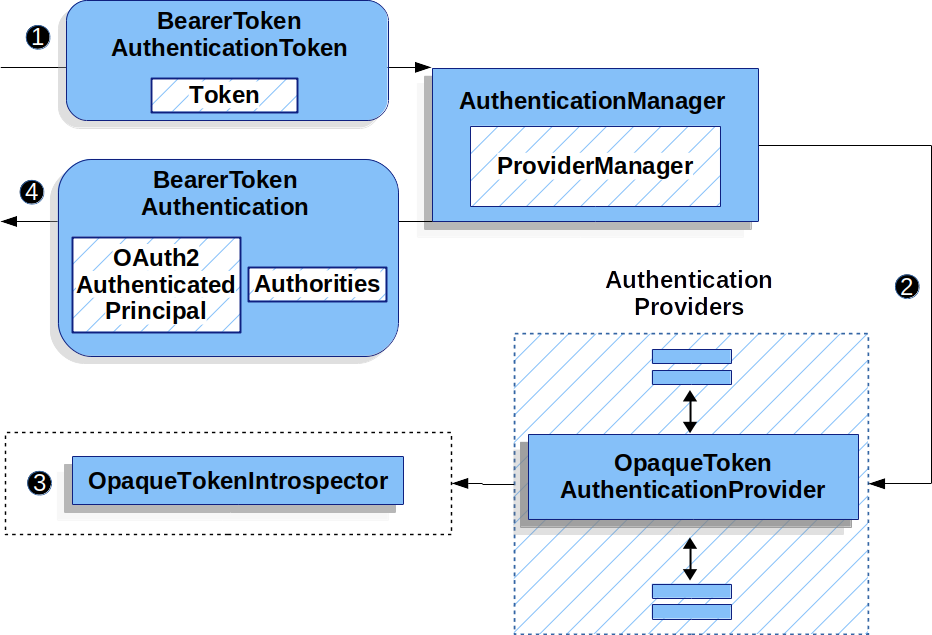
图 1. OpaqueTokenAuthenticationProvider 使用方式
1 来自读取承载令牌的身份验证 Filter 将一个 BearerTokenAuthenticationToken 传递给由 ProviderManager 实现的 AuthenticationManager。
2 ProviderManager 被配置为使用类型为 OpaqueTokenAuthenticationProvider 的 AuthenticationProvider。
3 OpaqueTokenAuthenticationProvider 对不透明令牌进行内省,并使用 OpaqueTokenIntrospector 添加授予的权限。当认证成功时,返回的 Authentication 类型为 BearerTokenAuthentication,其主体是由配置的 OpaqueTokenIntrospector 返回的 OAuth2AuthenticatedPrincipal,并且包含至少 FACTOR_BEARER 权限的权限集合。最终,返回的 BearerTokenAuthentication 将由认证 Filter 设置在 SecurityContextHolder 上。
认证后查找属性
一旦令牌通过认证,BearerTokenAuthentication 的一个实例就会被设置在 SecurityContext 中。
这意味着,当你在配置中使用 @EnableWebMvc 时,该功能在 @Controller 方法中可用:
- Java
- Kotlin
@GetMapping("/foo")
public String foo(BearerTokenAuthentication authentication) {
    return authentication.getTokenAttributes().get("sub") + " is the subject";
}
@GetMapping("/foo")
fun foo(authentication: BearerTokenAuthentication): String {
    return authentication.tokenAttributes["sub"].toString() + " is the subject"
}
由于 BearerTokenAuthentication 持有 OAuth2AuthenticatedPrincipal,这也意味着控制器方法同样可以访问它:
- Java
- Kotlin
@GetMapping("/foo")
public String foo(@AuthenticationPrincipal OAuth2AuthenticatedPrincipal principal) {
    return principal.getAttribute("sub") + " is the subject";
}
@GetMapping("/foo")
fun foo(@AuthenticationPrincipal principal: OAuth2AuthenticatedPrincipal): String {
    return principal.getAttribute<Any>("sub").toString() + " is the subject"
}
通过SpEL查找属性
当然,这也意味着可以通过 SpEL 访问属性。
例如,如果使用 @EnableGlobalMethodSecurity 以便能够使用 @PreAuthorize 注解,你可以这样做:
- Java
- Kotlin
@PreAuthorize("principal?.attributes['sub'] == 'foo'")
public String forFoosEyesOnly() {
    return "foo";
}
@PreAuthorize("principal?.attributes['sub'] == 'foo'")
fun forFoosEyesOnly(): String {
    return "foo"
}
覆盖或替换引导自动配置
Spring Boot 会代表资源服务器生成两个 @Bean。
第一个是 SecurityFilterChain,它将应用配置为资源服务器。当使用 Opaque Token 时,这个 SecurityFilterChain 看起来如下:
- Java
- Kotlin
@Bean
public SecurityFilterChain filterChain(HttpSecurity http) throws Exception {
    http
        .authorizeHttpRequests((authorize) -> authorize
            .anyRequest().authenticated()
        )
        .oauth2ResourceServer((oauth2) -> oauth2
            .opaqueToken(Customizer.withDefaults())
        );
    return http.build();
}
@Bean
open fun filterChain(http: HttpSecurity): SecurityFilterChain {
    http {
        authorizeHttpRequests {
            authorize(anyRequest, authenticated)
        }
        oauth2ResourceServer {
            opaqueToken { }
        }
    }
    return http.build()
}
如果应用程序没有暴露一个 SecurityFilterChain bean,那么 Spring Boot 将会暴露上述默认的配置。
替换这个操作非常简单,只需在应用程序中暴露该bean即可:
- Java
- Kotlin
import static org.springframework.security.oauth2.core.authorization.OAuth2AuthorizationManagers.hasScope;

@Configuration
@EnableWebSecurity
public class MyCustomSecurityConfiguration {
    @Bean
    public SecurityFilterChain filterChain(HttpSecurity http) throws Exception {
        http
            .authorizeHttpRequests((authorize) -> authorize
                .requestMatchers("/messages/**").access(hasScope("message:read"))
                .anyRequest().authenticated()
            )
            .oauth2ResourceServer((oauth2) -> oauth2
                .opaqueToken((opaqueToken) -> opaqueToken
                    .introspector(myIntrospector())
                )
            );
        return http.build();
    }
}
import org.springframework.security.oauth2.core.authorization.OAuth2AuthorizationManagers.hasScope;

@Configuration
@EnableWebSecurity
class MyCustomSecurityConfiguration {
    @Bean
    open fun filterChain(http: HttpSecurity): SecurityFilterChain {
        http {
            authorizeHttpRequests {
                authorize("/messages/**", hasScope("SCOPE_message:read"))
                authorize(anyRequest, authenticated)
            }
            oauth2ResourceServer {
                opaqueToken {
                    introspector = myIntrospector()
                }
            }
        }
        return http.build()
    }
}
上述要求适用于任何以 /messages/ 开头的 URL,需要 message:read 权限范围。
oauth2ResourceServer DSL 上的方法同样会覆盖或替换自动配置。
例如,Spring Boot 创建的第二个 @Bean 是一个 OpaqueTokenIntrospector,它将字符串令牌解码为经过验证的 OAuth2AuthenticatedPrincipal 实例:
- Java
- Kotlin
@Bean
public OpaqueTokenIntrospector introspector() {
    return SpringOpaqueTokenIntrospector.withIntrospectionUri(introspectionUri)
            .clientId(clientId).clientSecret(clientSecret).build();
}
@Bean
fun introspector(): OpaqueTokenIntrospector {
    return SpringOpaqueTokenIntrospector.withIntrospectionUri(introspectionUri)
            .clientId(clientId).clientSecret(clientSecret).build()
}
如果应用程序没有暴露一个 OpaqueTokenIntrospector bean,那么 Spring Boot 将会暴露上述默认的 bean。
其配置可以通过 introspectionUri() 和 introspectionClientCredentials() 进行覆盖,或使用 introspector() 进行替换。
如果应用程序没有暴露一个 OpaqueTokenAuthenticationConverter bean,那么 spring-security 将会构建 BearerTokenAuthentication。
或者,如果您完全没有使用 Spring Boot,那么所有这些组件——过滤器链、OpaqueTokenIntrospector 和 OpaqueTokenAuthenticationConverter——都可以在 XML 中配置。
过滤器链的配置方式如下:
- Xml
<http>
    <intercept-uri pattern="/**" access="authenticated"/>
    <oauth2-resource-server>
        <opaque-token introspector-ref="opaqueTokenIntrospector"
                authentication-converter-ref="opaqueTokenAuthenticationConverter"/>
    </oauth2-resource-server>
</http>
而 OpaqueTokenIntrospector 的配置如下:
- Xml
<bean id="opaqueTokenIntrospector"
        class="org.springframework.security.oauth2.server.resource.introspection.SpringOpaqueTokenIntrospector">
    <constructor-arg value="${spring.security.oauth2.resourceserver.opaquetoken.introspection_uri}"/>
    <constructor-arg value="${spring.security.oauth2.resourceserver.opaquetoken.client_id}"/>
    <constructor-arg value="${spring.security.oauth2.resourceserver.opaquetoken.client_secret}"/>
</bean>
而 OpaqueTokenAuthenticationConverter 则如下所示:
- Xml
<bean id="opaqueTokenAuthenticationConverter"
        class="com.example.CustomOpaqueTokenAuthenticationConverter"/>
使用 introspectionUri()
授权服务器的内省端点(Introspection Uri)可通过配置属性进行设置,也可通过 DSL 提供:
- Java
- Kotlin
- Xml
@Configuration
@EnableWebSecurity
public class DirectlyConfiguredIntrospectionUri {
    @Bean
    public SecurityFilterChain filterChain(HttpSecurity http) throws Exception {
        http
            .authorizeHttpRequests((authorize) -> authorize
                .anyRequest().authenticated()
            )
            .oauth2ResourceServer((oauth2) -> oauth2
                .opaqueToken((opaqueToken) -> opaqueToken
                    .introspectionUri("https://idp.example.com/introspect")
                    .introspectionClientCredentials("client", "secret")
                )
            );
        return http.build();
    }
}
@Configuration
@EnableWebSecurity
class DirectlyConfiguredIntrospectionUri {
    @Bean
    open fun filterChain(http: HttpSecurity): SecurityFilterChain {
        http {
            authorizeHttpRequests {
                authorize(anyRequest, authenticated)
            }
            oauth2ResourceServer {
                opaqueToken {
                    introspectionUri = "https://idp.example.com/introspect"
                    introspectionClientCredentials("client", "secret")
                }
            }
        }
        return http.build()
    }
}
<bean id="opaqueTokenIntrospector"
        class="org.springframework.security.oauth2.server.resource.introspection.SpringOpaqueTokenIntrospector">
    <constructor-arg value="https://idp.example.com/introspect"/>
    <constructor-arg value="client"/>
    <constructor-arg value="secret"/>
</bean>
使用 introspectionUri() 优先于任何配置属性。
使用 introspector()
比 introspectionUri() 更强大的是 introspector(),它将完全替换任何 Boot 对 OpaqueTokenIntrospector 的自动配置:
- Java
- Kotlin
- Xml
@Configuration
@EnableWebSecurity
public class DirectlyConfiguredIntrospector {
    @Bean
    public SecurityFilterChain filterChain(HttpSecurity http) throws Exception {
        http
            .authorizeHttpRequests((authorize) -> authorize
                .anyRequest().authenticated()
            )
            .oauth2ResourceServer((oauth2) -> oauth2
                .opaqueToken((opaqueToken) -> opaqueToken
                    .introspector(myCustomIntrospector())
                )
            );
        return http.build();
    }
}
@Configuration
@EnableWebSecurity
class DirectlyConfiguredIntrospector {
    @Bean
    open fun filterChain(http: HttpSecurity): SecurityFilterChain {
        http {
            authorizeHttpRequests {
                authorize(anyRequest, authenticated)
            }
            oauth2ResourceServer {
                opaqueToken {
                    introspector = myCustomIntrospector()
                }
            }
        }
        return http.build()
    }
}
<http>
    <intercept-uri pattern="/**" access="authenticated"/>
    <oauth2-resource-server>
        <opaque-token introspector-ref="myCustomIntrospector"/>
    </oauth2-resource-server>
</http>
暴露 OpaqueTokenIntrospector @Bean
或者,暴露一个 OpaqueTokenIntrospector @Bean 与使用 introspector() 方法具有相同的效果:
@Bean
public OpaqueTokenIntrospector introspector() {
    return return SpringOpaqueTokenIntrospector.withIntrospectionUri(introspectionUri)
            .clientId(clientId).clientSecret(clientSecret).build();
}
配置授权
OAuth 2.0 自省端点通常会返回一个 scope 属性,用于指示其被授予的权限范围(或权限),例如:
{ …, "scope" : "messages contacts"}
在这种情况下,资源服务器会尝试将这些作用域强制转换为已授予权限的列表,并在每个作用域前加上字符串"SCOPE_"。
这意味着,要使用从 Opaque Token 派生的作用域来保护端点或方法,相应的表达式应包含此前缀:
- Java
- Kotlin
- Xml
import static org.springframework.security.oauth2.core.authorization.OAuth2AuthorizationManagers.hasScope;

@Configuration
@EnableWebSecurity
public class MappedAuthorities {
    @Bean
    public SecurityFilterChain filterChain(HttpSecurity http) throws Exception {
        http
            .authorizeHttpRequests((authorizeRequests) -> authorizeRequests
                .requestMatchers("/contacts/**").access(hasScope("contacts"))
                .requestMatchers("/messages/**").access(hasScope("messages"))
                .anyRequest().authenticated()
            )
            .oauth2ResourceServer((oauth2) -> oauth2
                .opaqueToken(Customizer.withDefaults())
            );
        return http.build();
    }
}
import org.springframework.security.oauth2.core.authorization.OAuth2AuthorizationManagers.hasScope

@Configuration
@EnableWebSecurity
class MappedAuthorities {
    @Bean
    open fun filterChain(http: HttpSecurity): SecurityFilterChain {
       http {
            authorizeHttpRequests {
                authorize("/contacts/**", hasScope("contacts"))
                authorize("/messages/**", hasScope("messages"))
                authorize(anyRequest, authenticated)
            }
           oauth2ResourceServer {
               opaqueToken { }
           }
        }
        return http.build()
    }
}
<http>
    <intercept-uri pattern="/contacts/**" access="hasAuthority('SCOPE_contacts')"/>
    <intercept-uri pattern="/messages/**" access="hasAuthority('SCOPE_messages')"/>
    <oauth2-resource-server>
        <opaque-token introspector-ref="opaqueTokenIntrospector"/>
    </oauth2-resource-server>
</http>
或者,在方法安全方面也是如此:
- Java
- Kotlin
@PreAuthorize("hasAuthority('SCOPE_messages')")
public List<Message> getMessages(...) {}
@PreAuthorize("hasAuthority('SCOPE_messages')")
fun getMessages(): List<Message?> {}
手动提取权限
默认情况下,Opaque Token 支持会从内省响应中提取 scope 声明,并将其解析为独立的 GrantedAuthority 实例。
例如,如果内省响应为:
{
    "active" : true,
    "scope" : "message:read message:write"
}
随后,资源服务器将生成一个包含两个权限的 Authentication 对象,一个用于 message:read,另一个用于 message:write。
当然,这可以通过自定义的OpaqueTokenIntrospector进行定制,该检查器会查看属性集并以自己的方式进行转换:
- Java
- Kotlin
public class CustomAuthoritiesOpaqueTokenIntrospector implements OpaqueTokenIntrospector {
    private OpaqueTokenIntrospector delegate = SpringOpaqueTokenIntrospector
            .withIntrospectionUri("https://idp.example.org/introspect")
            .clientId("client").clientSecret("secret").build();

    public OAuth2AuthenticatedPrincipal introspect(String token) {
        OAuth2AuthenticatedPrincipal principal = this.delegate.introspect(token);
        return new DefaultOAuth2AuthenticatedPrincipal(
                principal.getName(), principal.getAttributes(), extractAuthorities(principal));
    }

    private Collection<GrantedAuthority> extractAuthorities(OAuth2AuthenticatedPrincipal principal) {
        List<String> scopes = principal.getAttribute(OAuth2IntrospectionClaimNames.SCOPE);
        return scopes.stream()
                .map(SimpleGrantedAuthority::new)
                .collect(Collectors.toList());
    }
}
class CustomAuthoritiesOpaqueTokenIntrospector : OpaqueTokenIntrospector {
    private val delegate: OpaqueTokenIntrospector = SpringOpaqueTokenIntrospector
            .withIntrospectionUri("https://idp.example.org/introspect")
            .clientId("client").clientSecret("secret").build()
    override fun introspect(token: String): OAuth2AuthenticatedPrincipal {
        val principal: OAuth2AuthenticatedPrincipal = delegate.introspect(token)
        return DefaultOAuth2AuthenticatedPrincipal(
                principal.name, principal.attributes, extractAuthorities(principal))
    }

    private fun extractAuthorities(principal: OAuth2AuthenticatedPrincipal): Collection<GrantedAuthority> {
        val scopes: List<String> = principal.getAttribute(OAuth2IntrospectionClaimNames.SCOPE)
        return scopes
                .map { SimpleGrantedAuthority(it) }
    }
}
此后,只需将此自定义内省器暴露为 @Bean 即可轻松完成配置:
- Java
- Kotlin
@Bean
public OpaqueTokenIntrospector introspector() {
    return new CustomAuthoritiesOpaqueTokenIntrospector();
}
@Bean
fun introspector(): OpaqueTokenIntrospector {
    return CustomAuthoritiesOpaqueTokenIntrospector()
}
配置超时
默认情况下,资源服务器在与授权服务器协调时,连接和套接字超时时间均为30秒。
在某些场景下,这可能过于简短。此外,它没有考虑到更复杂的模式,比如回退和发现。
要调整资源服务器连接授权服务器的方式,SpringOpaqueTokenIntrospector 接受一个 RestOperations 实例:
- Java
- Kotlin
@Bean
public OpaqueTokenIntrospector introspector(RestTemplateBuilder builder, OAuth2ResourceServerProperties properties) {
    RestOperations rest = builder
            .basicAuthentication(properties.getOpaquetoken().getClientId(), properties.getOpaquetoken().getClientSecret())
            .setConnectTimeout(Duration.ofSeconds(60))
            .setReadTimeout(Duration.ofSeconds(60))
            .build();

    return SpringOpaqueTokenIntrospector(introspectionUri, rest);
}
@Bean
fun introspector(builder: RestTemplateBuilder, properties: OAuth2ResourceServerProperties): OpaqueTokenIntrospector? {
    val rest: RestOperations = builder
            .basicAuthentication(properties.opaquetoken.clientId, properties.opaquetoken.clientSecret)
            .setConnectTimeout(Duration.ofSeconds(60))
            .setReadTimeout(Duration.ofSeconds(60))
            .build()
    return SpringOpaqueTokenIntrospector(introspectionUri, rest)
}
使用内省机制处理JWT令牌
一个常见的问题是内省是否与JWT兼容。Spring Security的不透明令牌支持在设计上并不关心令牌的格式——它很乐意将任何令牌传递给所提供的内省端点。
那么,假设你有一个需求,要求你在每个请求中都向授权服务器进行验证,以防 JWT 已被撤销。
尽管你使用了 JWT 格式的令牌,但你的验证方法是内省(introspection),这意味着你需要执行:
spring:
  security:
    oauth2:
      resourceserver:
        opaquetoken:
          introspection-uri: https://idp.example.org/introspection
          client-id: client
          client-secret: secret
在这种情况下,生成的 Authentication 将是 BearerTokenAuthentication。对应 OAuth2AuthenticatedPrincipal 中的任何属性,都将是由内省端点返回的内容。
但是,假设——奇怪的是——内省端点只返回令牌是否处于活动状态。现在该怎么办?
在这种情况下,您可以创建一个自定义的 OpaqueTokenIntrospector,它仍然会调用端点,但随后会更新返回的主体,使其将 JWT 的声明作为属性:
- Java
- Kotlin
public class JwtOpaqueTokenIntrospector implements OpaqueTokenIntrospector {
    private OpaqueTokenIntrospector delegate = SpringOpaqueTokenIntrospector
            .withIntrospectionUri("https://idp.example.org/introspect")
            .clientId("client").clientSecret("secret").build();
    private JwtDecoder jwtDecoder = new NimbusJwtDecoder(new ParseOnlyJWTProcessor());

    public OAuth2AuthenticatedPrincipal introspect(String token) {
        OAuth2AuthenticatedPrincipal principal = this.delegate.introspect(token);
        try {
            Jwt jwt = this.jwtDecoder.decode(token);
            return new DefaultOAuth2AuthenticatedPrincipal(jwt.getClaims(), NO_AUTHORITIES);
        } catch (JwtException ex) {
            throw new OAuth2IntrospectionException(ex);
        }
    }

    private static class ParseOnlyJWTProcessor extends DefaultJWTProcessor<SecurityContext> {
    	JWTClaimsSet process(SignedJWT jwt, SecurityContext context)
                throws JOSEException {
            return jwt.getJWTClaimsSet();
        }
    }
}
class JwtOpaqueTokenIntrospector : OpaqueTokenIntrospector {
    private val delegate: OpaqueTokenIntrospector = SpringOpaqueTokenIntrospector
            .withIntrospectionUri("https://idp.example.org/introspect")
            .clientId("client").clientSecret("secret").build()
    private val jwtDecoder: JwtDecoder = NimbusJwtDecoder(ParseOnlyJWTProcessor())
    override fun introspect(token: String): OAuth2AuthenticatedPrincipal {
        val principal = delegate.introspect(token)
        return try {
            val jwt: Jwt = jwtDecoder.decode(token)
            DefaultOAuth2AuthenticatedPrincipal(jwt.claims, NO_AUTHORITIES)
        } catch (ex: JwtException) {
            throw OAuth2IntrospectionException(ex.message)
        }
    }

    private class ParseOnlyJWTProcessor : DefaultJWTProcessor<SecurityContext>() {
        override fun process(jwt: SignedJWT, context: SecurityContext): JWTClaimsSet {
            return jwt.jwtClaimsSet
        }
    }
}
此后,只需将此自定义内省器暴露为 @Bean 即可轻松完成配置:
- Java
- Kotlin
@Bean
public OpaqueTokenIntrospector introspector() {
    return new JwtOpaqueTokenIntrospector();
}
@Bean
fun introspector(): OpaqueTokenIntrospector {
    return JwtOpaqueTokenIntrospector()
}
调用 /userinfo 端点
一般来说,资源服务器并不关心底层用户,而是关注已被授予的权限。
话虽如此,有时将授权声明与用户关联起来会很有价值。
如果应用程序同时使用了 spring-security-oauth2-client,并已配置好相应的 ClientRegistrationRepository,那么通过自定义的OpaqueTokenIntrospector 实现会非常简单。下面的实现主要完成三件事:
-
委托给内省端点,以确认令牌的有效性
-
查找与
/userinfo端点关联的相应客户端注册信息 -
调用并返回来自
/userinfo端点的响应
- Java
- Kotlin
public class UserInfoOpaqueTokenIntrospector implements OpaqueTokenIntrospector {
    private final OpaqueTokenIntrospector delegate = SpringOpaqueTokenIntrospector
            .withIntrospectionUri("https://idp.example.org/introspect")
            .clientId("client").clientSecret("secret").build();
    private final OAuth2UserService oauth2UserService = new DefaultOAuth2UserService();

    private final ClientRegistrationRepository repository;

    // ... constructor

    @Override
    public OAuth2AuthenticatedPrincipal introspect(String token) {
        OAuth2AuthenticatedPrincipal authorized = this.delegate.introspect(token);
        Instant issuedAt = authorized.getAttribute(ISSUED_AT);
        Instant expiresAt = authorized.getAttribute(EXPIRES_AT);
        ClientRegistration clientRegistration = this.repository.findByRegistrationId("registration-id");
        OAuth2AccessToken token = new OAuth2AccessToken(BEARER, token, issuedAt, expiresAt);
        OAuth2UserRequest oauth2UserRequest = new OAuth2UserRequest(clientRegistration, token);
        return this.oauth2UserService.loadUser(oauth2UserRequest);
    }
}
class UserInfoOpaqueTokenIntrospector : OpaqueTokenIntrospector {
    private val delegate: OpaqueTokenIntrospector = SpringOpaqueTokenIntrospector
            .withIntrospectionUri("https://idp.example.org/introspect")
            .clientId("client").clientSecret("secret").build()
    private val oauth2UserService = DefaultOAuth2UserService()
    private val repository: ClientRegistrationRepository? = null

    // ... constructor

    override fun introspect(token: String): OAuth2AuthenticatedPrincipal {
        val authorized = delegate.introspect(token)
        val issuedAt: Instant? = authorized.getAttribute(ISSUED_AT)
        val expiresAt: Instant? = authorized.getAttribute(EXPIRES_AT)
        val clientRegistration: ClientRegistration = repository!!.findByRegistrationId("registration-id")
        val accessToken = OAuth2AccessToken(BEARER, token, issuedAt, expiresAt)
        val oauth2UserRequest = OAuth2UserRequest(clientRegistration, accessToken)
        return oauth2UserService.loadUser(oauth2UserRequest)
    }
}
如果你没有使用 spring-security-oauth2-client,操作依然相当简单。你只需要使用自己的 WebClient 实例来调用 /userinfo 接口:
- Java
- Kotlin
public class UserInfoOpaqueTokenIntrospector implements OpaqueTokenIntrospector {
    private final OpaqueTokenIntrospector delegate = SpringOpaqueTokenIntrospector
            .withIntrospectionUri("https://idp.example.org/introspect")
            .clientId("client").clientSecret("secret").build();
    private final WebClient rest = WebClient.create();

    @Override
    public OAuth2AuthenticatedPrincipal introspect(String token) {
        OAuth2AuthenticatedPrincipal authorized = this.delegate.introspect(token);
        return makeUserInfoRequest(authorized);
    }
}
class UserInfoOpaqueTokenIntrospector : OpaqueTokenIntrospector {
    private val delegate: OpaqueTokenIntrospector = SpringOpaqueTokenIntrospector
            .withIntrospectionUri("https://idp.example.org/introspect")
            .clientId("client").clientSecret("secret").build()
    private val rest: WebClient = WebClient.create()

    override fun introspect(token: String): OAuth2AuthenticatedPrincipal {
        val authorized = delegate.introspect(token)
        return makeUserInfoRequest(authorized)
    }
}
无论哪种方式,创建好你的 OpaqueTokenIntrospector 后,都应将其发布为 @Bean 以覆盖默认配置:
- Java
- Kotlin
@Bean
OpaqueTokenIntrospector introspector() {
    return new UserInfoOpaqueTokenIntrospector(...);
}
@Bean
fun introspector(): OpaqueTokenIntrospector {
    return UserInfoOpaqueTokenIntrospector(...)
}