VertexAI Gemini 聊天
Vertex AI Gemini API 允许开发者使用 Gemini 模型构建生成式 AI 应用程序。Vertex AI Gemini API 支持以多模态提示作为输入,并输出文本或代码。多模态模型是一种能够处理来自多种模态信息的模型,包括图像、视频和文本。例如,你可以向模型发送一张饼干盘子的照片,并要求它为你提供制作这些饼干的食谱。
Gemini 是由 Google DeepMind 开发的一系列生成式 AI 模型,专为多模态应用场景而设计。Gemini API 可让您访问 Gemini 2.0 Flash 和 Gemini 2.0 Flash-Lite。有关 Vertex AI Gemini API 模型的规格信息,请参阅 模型信息。
前提条件
-
安装适用于您操作系统的 gcloud CLI。
-
通过运行以下命令进行身份验证。将
PROJECT_ID替换为您的 Google Cloud 项目 ID,并将ACCOUNT替换为您的 Google Cloud 用户名。
gcloud config set project <PROJECT_ID> &&
gcloud auth application-default login <ACCOUNT>
自动配置
Spring AI 的自动配置和 starter 模块的 artifact 名称发生了重大变化。更多信息请参阅升级说明。
Spring AI 为 VertexAI Gemini 聊天客户端提供了 Spring Boot 自动配置功能。要启用此功能,请将以下依赖项添加到您项目的 Maven pom.xml 或 Gradle build.gradle 构建文件中:
- Maven
- Gradle
<dependency>
    <groupId>org.springframework.ai</groupId>
    <artifactId>spring-ai-starter-model-vertex-ai-gemini</artifactId>
</dependency>
dependencies {
    implementation 'org.springframework.ai:spring-ai-starter-model-vertex-ai-gemini'
}
:::提示
请参考依赖管理章节,将 Spring AI BOM 添加到您的构建文件中。
:::
聊天属性
现在,聊天自动配置的启用和禁用是通过前缀为 spring.ai.model.chat 的顶级属性来配置的。
要启用,设置 spring.ai.model.chat=vertexai (默认已启用)
要禁用,设置 spring.ai.model.chat=none (或任何与 vertexai 不匹配的值)
进行此更改是为了允许多个模型的配置。
前缀 spring.ai.vertex.ai.gemini 被用作属性前缀,允许你连接到 VertexAI。
| 属性 | 描述 | 默认值 |
|---|---|---|
| spring.ai.model.chat | 启用聊天模型客户端 | vertexai |
| spring.ai.vertex.ai.gemini.project-id | Google Cloud Platform 项目 ID | - |
| spring.ai.vertex.ai.gemini.location | 区域 | - |
| spring.ai.vertex.ai.gemini.credentials-uri | Vertex AI Gemini 凭据的 URI。提供时,将用于创建 GoogleCredentials 实例以对 VertexAI 进行身份验证。 | - |
| spring.ai.vertex.ai.gemini.api-endpoint | Vertex AI Gemini API 端点。 | - |
| spring.ai.vertex.ai.gemini.scopes | - | |
| spring.ai.vertex.ai.gemini.transport | API 传输方式。GRPC 或 REST。 | GRPC |
spring.ai.vertex.ai.gemini.chat 是用于配置 VertexAI Gemini Chat 聊天模型实现的属性前缀。
| 属性 | 描述 | 默认值 |
|---|---|---|
| spring.ai.vertex.ai.gemini.chat.options.model | 支持的 Vertex AI Gemini Chat 模型 包括 gemini-2.0-flash、gemini-2.0-flash-lite 以及新的 gemini-2.5-pro-preview-03-25、gemini-2.5-flash-preview-04-17 模型。 | gemini-2.0-flash |
| spring.ai.vertex.ai.gemini.chat.options.response-mime-type | 生成的候选文本的输出响应 MIME 类型。 | text/plain:(默认)文本输出或 application/json: JSON 响应。 |
| spring.ai.vertex.ai.gemini.chat.options.response-schema | 字符串,包含 OpenAPI 格式的输出响应模式,如 ai.google.dev/gemini-api/docs/structured-output#json-schemas 中所述。 | - |
| spring.ai.vertex.ai.gemini.chat.options.google-search-retrieval | 使用 Google 搜索 Grounding 功能。 | true 或 false, 默认为 false。 |
| spring.ai.vertex.ai.gemini.chat.options.temperature | 控制输出的随机性。取值范围为 [0.0, 1.0],包含边界值。越接近 1.0 的值会产生更多样化的响应,而越接近 0.0 的值通常会导致生成式模型产生较少意外的响应。此值指定后端在调用生成式模型时使用的默认值。 | 0.7 |
| spring.ai.vertex.ai.gemini.chat.options.top-k | 采样时考虑的最大 token 数量。生成式模型使用 Top-k 和 nucleus 采样相结合的方式。Top-k 采样考虑概率最高的 topK 个 token 的集合。 | - |
| spring.ai.vertex.ai.gemini.chat.options.top-p | 采样时考虑的 token 的最大累积概率。生成式模型使用 Top-k 和 nucleus 采样相结合的方式。Nucleus 采样考虑概率总和至少为 topP 的最小 token 集合。 | - |
| spring.ai.vertex.ai.gemini.chat.options.candidate-count | 要返回的生成的响应消息数量。此值必须在 [1, 8] 范围内,包含边界值。默认为 1。 | 1 |
| spring.ai.vertex.ai.gemini.chat.options.max-output-tokens | 要生成的最大 token 数量。 | - |
| spring.ai.vertex.ai.gemini.chat.options.tool-names | 工具名称列表,用于在单个提示请求中启用函数调用。具有这些名称的工具必须存在于 ToolCallback 注册表中。 | - |
| spring.ai.vertex.ai.gemini.chat.options.tool-callbacks | 要注册到 ChatModel 的 Tool Callback。 | - |
| spring.ai.vertex.ai.gemini.chat.options.internal-tool-execution-enabled | 如果为 true,则应执行工具调用;否则,模型的响应将返回给用户。默认为 null,但如果为 null,则会考虑 ToolCallingChatOptions.DEFAULT_TOOL_EXECUTION_ENABLED(该值为 true) | - |
| spring.ai.vertex.ai.gemini.chat.options.safety-settings | 用于控制安全过滤器的安全设置列表,由 Vertex AI 安全过滤器 定义。每个安全设置可以包含方法、阈值和类别。 | - |
:::提示
所有以 spring.ai.vertex.ai.gemini.chat.options 为前缀的属性,都可以在运行时通过在 Prompt 调用中添加请求特定的运行时选项来覆盖。
:::
运行时选项
VertexAiGeminiChatOptions.java 提供了模型配置选项,例如温度参数(temperature)、topK 参数等。
在启动时,可以通过VertexAiGeminiChatModel(api, options)构造函数或spring.ai.vertex.ai.chat.options.*属性来配置默认选项。
在运行时,你可以通过为 Prompt 调用添加新的、特定于请求的选项来覆盖默认选项。例如,要为特定请求覆盖默认的温度参数:
ChatResponse response = chatModel.call(
    new Prompt(
        "Generate the names of 5 famous pirates.",
        VertexAiGeminiChatOptions.builder()
            .temperature(0.4)
        .build()
    ));
除了特定于模型的 VertexAiGeminiChatOptions 外,您还可以使用一个可移植的 ChatOptions 实例,该实例通过 ChatOptions#builder() 创建。
工具调用
Vertex AI Gemini模型支持工具调用功能(在Google Gemini语境中,称为function calling功能),允许模型在对话过程中使用工具。以下是一个如何定义和使用基于@Tool工具的具体示例:
public class WeatherService {

    @Tool(description = "Get the weather in location")
    public String weatherByLocation(@ToolParam(description= "City or state name") String location) {
        ...
    }
}

String response = ChatClient.create(this.chatModel)
        .prompt("What's the weather like in Boston?")
        .tools(new WeatherService())
        .call()
        .content();
你也可以使用 java.util.function 包中的函数式接口作为工具:
@Bean
@Description("Get the weather in location. Return temperature in 36°F or 36°C format.")
public Function<Request, Response> weatherFunction() {
    return new MockWeatherService();
}

String response = ChatClient.create(this.chatModel)
        .prompt("What's the weather like in Boston?")
        .toolNames("weatherFunction")
        .inputType(Request.class)
        .call()
        .content();
更多信息请查看工具文档。
多模态
多模态是指模型同时理解和处理多种(输入)源信息的能力,包括 文本、pdf、图像、音频 以及其他数据格式。
图像、音频、视频
Google的Gemini AI模型通过理解并整合文本、代码、音频、图像和视频来支持这一能力。更多详情,请参阅博客文章 Introducing Gemini。
Spring AI 的 Message 接口通过引入 Media 类型来支持多模态 AI 模型。该类型包含消息中媒体附件的数据和信息,使用 Spring 的 org.springframework.util.MimeType 和 java.lang.Object 来处理原始媒体数据。
以下是一个简单的代码示例,提取自 VertexAiGeminiChatModelIT#multiModalityTest(),展示了用户文本与图像的结合使用。
byte[] data = new ClassPathResource("/vertex-test.png").getContentAsByteArray();

var userMessage = new UserMessage("Explain what do you see on this picture?",
        List.of(new Media(MimeTypeUtils.IMAGE_PNG, this.data)));

ChatResponse response = chatModel.call(new Prompt(List.of(this.userMessage)));
PDF
最新版Vertex Gemini现已支持PDF文件输入类型。请使用application/pdf媒体类型将PDF文件附加到消息中:
var pdfData = new ClassPathResource("/spring-ai-reference-overview.pdf");

var userMessage = new UserMessage(
        "You are a very professional document summarization specialist. Please summarize the given document.",
        List.of(new Media(new MimeType("application", "pdf"), pdfData)));

var response = this.chatModel.call(new Prompt(List.of(userMessage)));
安全设置与安全评级
Vertex AI Gemini API 提供了安全过滤功能,可帮助您控制提示词与响应中的有害内容。如需了解更多详情,请参阅 Vertex AI 安全过滤文档。
配置安全设置
您可以配置安全设置来控制不同危害类别内容被屏蔽的阈值。可用的危害类别包括:
-
HARM_CATEGORY_HATE_SPEECH- 仇恨言论内容 -
HARM_CATEGORY_DANGEROUS_CONTENT- 危险内容 -
HARM_CATEGORY_HARASSMENT- 骚扰内容 -
HARM_CATEGORY_SEXUALLY_EXPLICIT- 露骨色情内容 -
HARM_CATEGORY_CIVIC_INTEGRITY- 公民诚信内容
可用的阈值级别包括:
-
BLOCK_LOW_AND_ABOVE- 当内容被识别为低、中或高概率不安全时进行拦截 -
BLOCK_MEDIUM_AND_ABOVE- 当内容被识别为中或高概率不安全时进行拦截 -
BLOCK_ONLY_HIGH- 仅当内容被识别为高概率不安全时进行拦截 -
BLOCK_NONE- 从不拦截(请谨慎使用)
List<VertexAiGeminiSafetySetting> safetySettings = List.of(
    VertexAiGeminiSafetySetting.builder()
        .withCategory(VertexAiGeminiSafetySetting.HarmCategory.HARM_CATEGORY_HARASSMENT)
        .withThreshold(VertexAiGeminiSafetySetting.HarmBlockThreshold.BLOCK_LOW_AND_ABOVE)
        .build(),
    VertexAiGeminiSafetySetting.builder()
        .withCategory(VertexAiGeminiSafetySetting.HarmCategory.HARM_CATEGORY_HATE_SPEECH)
        .withThreshold(VertexAiGeminiSafetySetting.HarmBlockThreshold.BLOCK_MEDIUM_AND_ABOVE)
        .build());

ChatResponse response = chatModel.call(new Prompt("Your prompt here",
    VertexAiGeminiChatOptions.builder()
        .safetySettings(safetySettings)
        .build()));
在响应中访问安全评级
当配置安全设置时,Gemini API会为每个候选回复返回安全评级。这些评级表明了每个类别中有害内容的概率和严重程度。
安全评级可在 AssistantMessage 元数据的 "safetyRatings" 键下获取:
ChatResponse response = chatModel.call(new Prompt(prompt,
    VertexAiGeminiChatOptions.builder()
        .safetySettings(safetySettings)
        .build()));

// Access safety ratings from the response
List<VertexAiGeminiSafetyRating> safetyRatings =
    (List<VertexAiGeminiSafetyRating>) response.getResult()
        .getOutput()
        .getMetadata()
        .get("safetyRatings");

for (VertexAiGeminiSafetyRating rating : safetyRatings) {
    System.out.println("Category: " + rating.category());
    System.out.println("Probability: " + rating.probability());
    System.out.println("Severity: " + rating.severity());
    System.out.println("Blocked: " + rating.blocked());
}
VertexAiGeminiSafetyRating 记录包含:
-
category- 伤害类别(例如HARM_CATEGORY_HARASSMENT) -
probability- 概率等级(NEGLIGIBLE、LOW、MEDIUM、HIGH) -
blocked- 内容是否因该评级而被阻止 -
probabilityScore- 原始概率分数(0.0 到 1.0) -
severity- 严重程度等级(HARM_SEVERITY_NEGLIGIBLE、HARM_SEVERITY_LOW、HARM_SEVERITY_MEDIUM、HARM_SEVERITY_HIGH) -
severityScore- 原始严重程度分数(0.0 到 1.0)
示例控制器
创建一个新的Spring Boot项目,并将 spring-ai-starter-model-vertex-ai-gemini 添加到你的pom(或gradle)依赖中。
在src/main/resources目录下添加一个application.properties文件,以启用并配置VertexAi聊天模型:
spring.ai.vertex.ai.gemini.project-id=PROJECT_ID
spring.ai.vertex.ai.gemini.location=LOCATION
spring.ai.vertex.ai.gemini.chat.options.model=gemini-2.0-flash
spring.ai.vertex.ai.gemini.chat.options.temperature=0.5
:::提示
将 project-id 替换为你的 Google Cloud 项目 ID,而 location 是 Google Cloud 区域,如 us-central1、europe-west1 等…
:::
每个模型都有其支持的区域列表,你可以在模型页面找到这些信息。
例如,model=gemini-2.5-flash 目前仅在 us-central1 区域可用,你必须设置 location=us-central1,具体请参考模型页面 Gemini 2.5 Flash - 支持的区域。
这将创建一个 VertexAiGeminiChatModel 实现,你可以将其注入到你的类中。以下是一个使用该聊天模型进行文本生成的简单 @Controller 类示例。
@RestController
public class ChatController {

    private final VertexAiGeminiChatModel chatModel;

    @Autowired
    public ChatController(VertexAiGeminiChatModel chatModel) {
        this.chatModel = chatModel;
    }

    @GetMapping("/ai/generate")
    public Map generate(@RequestParam(value = "message", defaultValue = "Tell me a joke") String message) {
        return Map.of("generation", this.chatModel.call(message));
    }

    @GetMapping("/ai/generateStream")
	public Flux<ChatResponse> generateStream(@RequestParam(value = "message", defaultValue = "Tell me a joke") String message) {
        Prompt prompt = new Prompt(new UserMessage(message));
        return this.chatModel.stream(prompt);
    }
}
手动配置
VertexAiGeminiChatModel 实现了 ChatModel 接口,并使用 VertexAI 来连接 Vertex AI Gemini 服务。
将 spring-ai-vertex-ai-gemini 依赖项添加到项目的 Maven pom.xml 文件中:
<dependency>
    <groupId>org.springframework.ai</groupId>
    <artifactId>spring-ai-vertex-ai-gemini</artifactId>
</dependency>
或添加到你的 Gradle build.gradle 构建文件中。
dependencies {
    implementation 'org.springframework.ai:spring-ai-vertex-ai-gemini'
}
请参考 依赖管理 部分,将 Spring AI BOM 添加到您的构建文件中。
接下来,创建一个 VertexAiGeminiChatModel 并使用它进行文本生成:
VertexAI vertexApi =  new VertexAI(projectId, location);

var chatModel = new VertexAiGeminiChatModel(this.vertexApi,
    VertexAiGeminiChatOptions.builder()
        .model(ChatModel.GEMINI_2_0_FLASH)
        .temperature(0.4)
    .build());

ChatResponse response = this.chatModel.call(
    new Prompt("Generate the names of 5 famous pirates."));
VertexAiGeminiChatOptions 提供了聊天请求的配置信息。VertexAiGeminiChatOptions.Builder 是一个流畅的选项构建器。
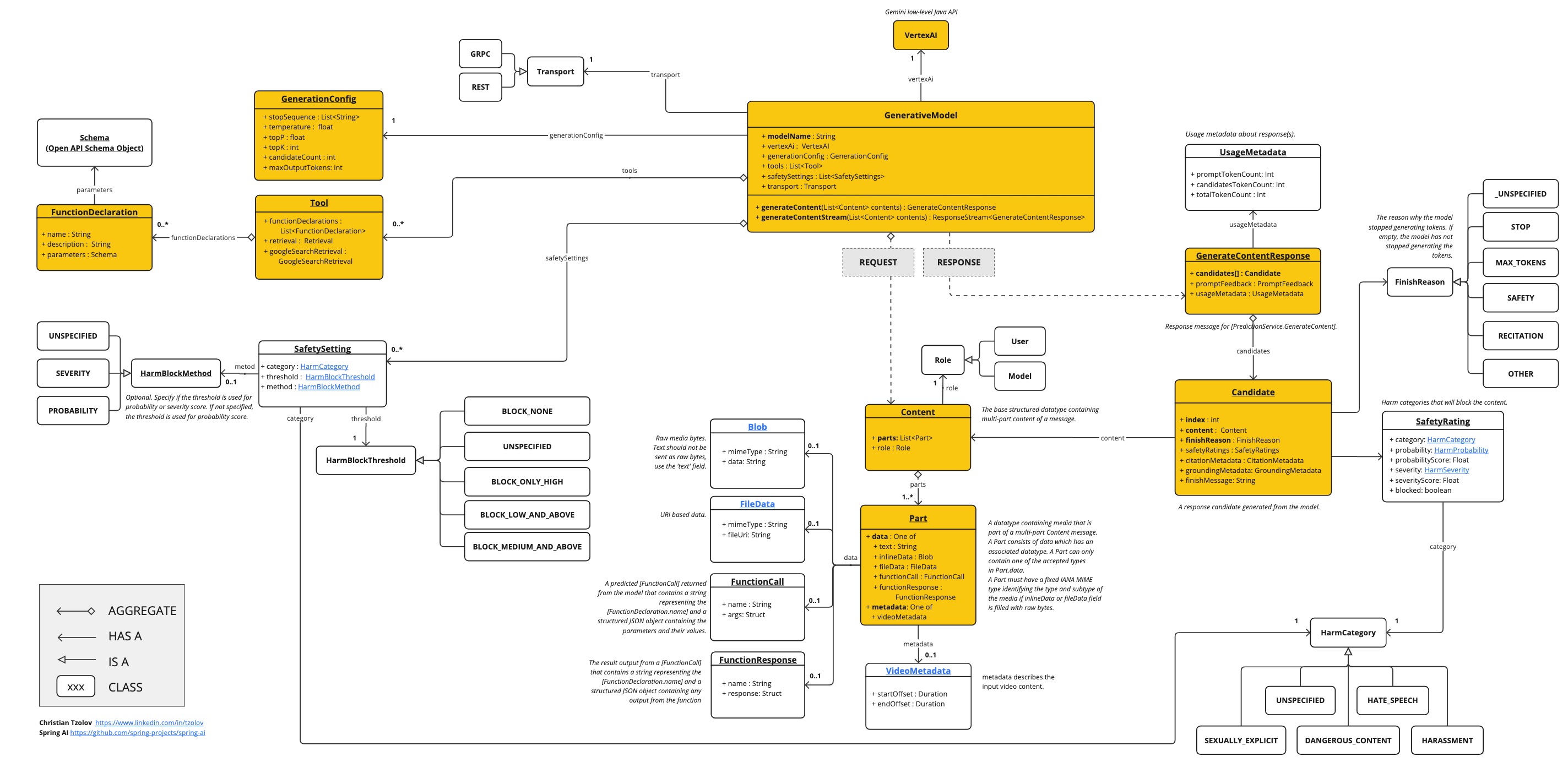
低级别 Java 客户端
以下类图展示了Vertex AI Gemini原生Java API: